L
Laragon
Global environment switching (Windows only)
PHP 8.3
Active environment
 PHP
PHP Nginx
NginxGlobal services
Switch together
 Apache
 MySQL
MySQL Redis
RedisOne local environment for all projects. Switch PHP, web server and services globally.
Comparison
Laragon is a lightweight and easy-to-use local server environment for Windows, focused on web/PHP development. FlyEnv is a native cross-platform workspace that lets you match each project to its own runtimes and services.
Global environment switching (Windows only)
PHP 8.3
Active environment
PHPNginxGlobal services
Switch together
ApacheMySQLRedisOne local environment for all projects. Switch PHP, web server and services globally.
A dedicated environment per project (macOS, Windows, Linux)
Laravel · Project
NginxPHP 8.3MySQLRedisWordPress · Project
ApachePHP 7.4 MariaDBMailpit
Node.js App · Project
 Caddy
Caddy Node.js
 PostgreSQL
 MinIO
MinIOEach project has its own runtimes, services, ports, and configuration.
Both are excellent tools, but they are built with different goals and design philosophies.
Laragon runs on Windows. FlyEnv works natively across macOS, Windows and Linux.
Laragon focuses on global environment switching; FlyEnv lets each project keep its own settings.
Laragon stays compact and extensible. FlyEnv brings runtimes, services and project tools into one workspace.
Same purpose, different development scope.
Lightweight and flexible (Windows)
ApacheNginxPHPMySQLC:\laragon\www (web root)
▸project-a
▸project-b
▸project-c
Project-based environments (macOS / Windows / Linux)
 Laravel
Nginx
PHP 8.3
MySQL
Redis
 WordPress
Apache
PHP 7.4
MariaDB
Mailpit
Node.js App
Caddy
Node.js
PostgreSQL
MinIO
See the same setup in FlyEnv's runtime, Host, and service workflows.
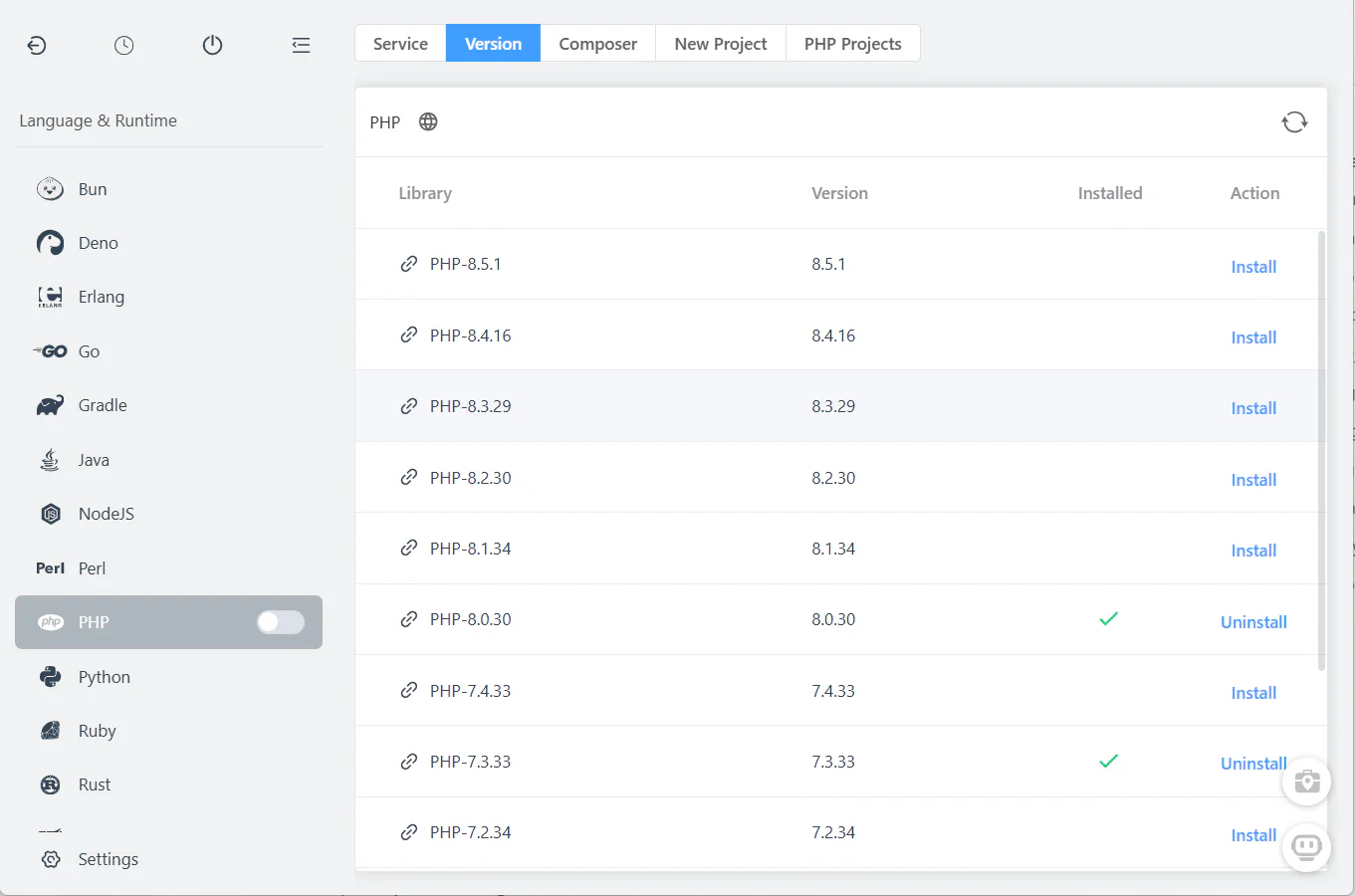
Install and run multiple PHP versions side by side without conflicts.
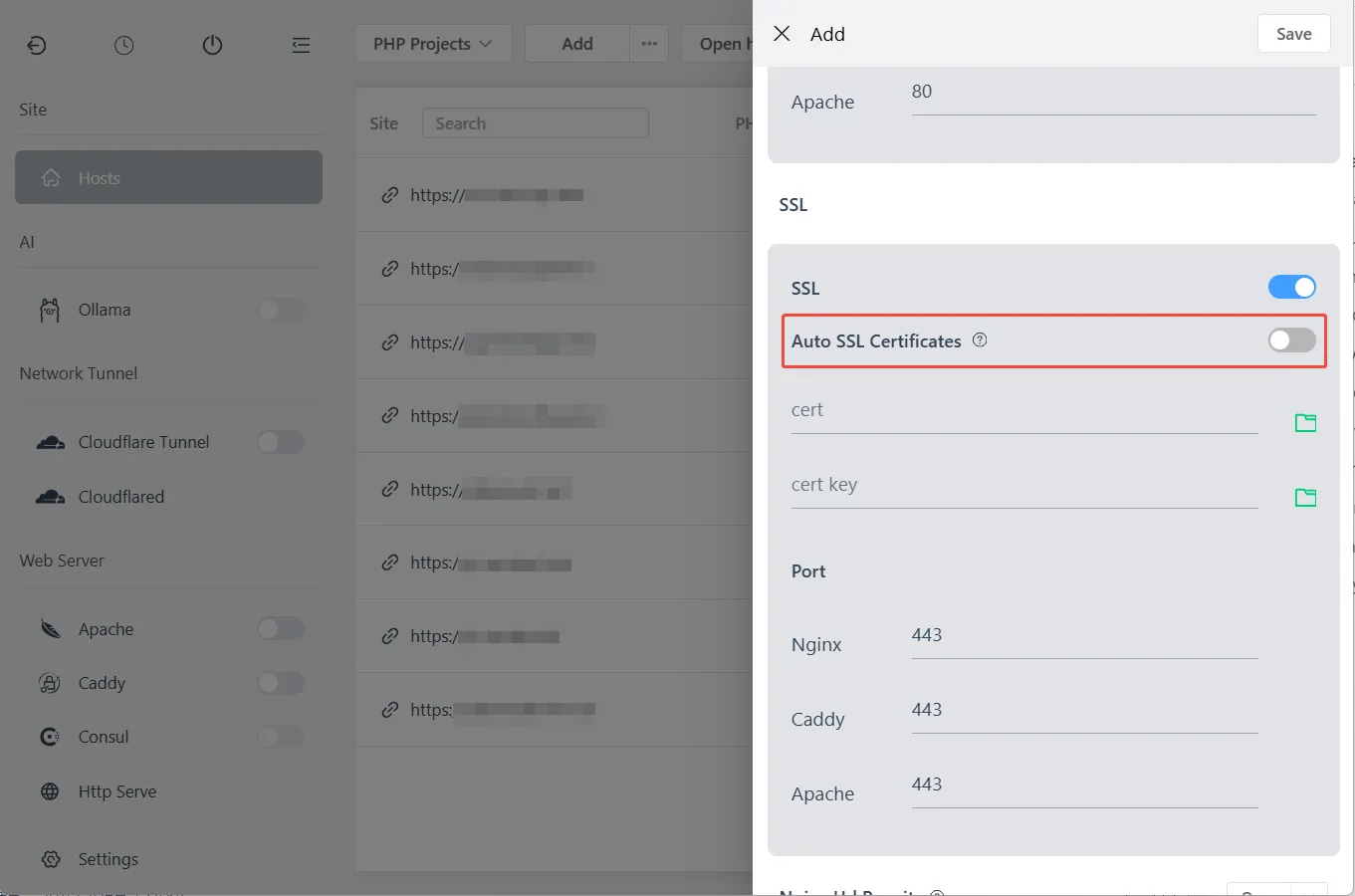
Create local sites with custom domains and automatic HTTPS.
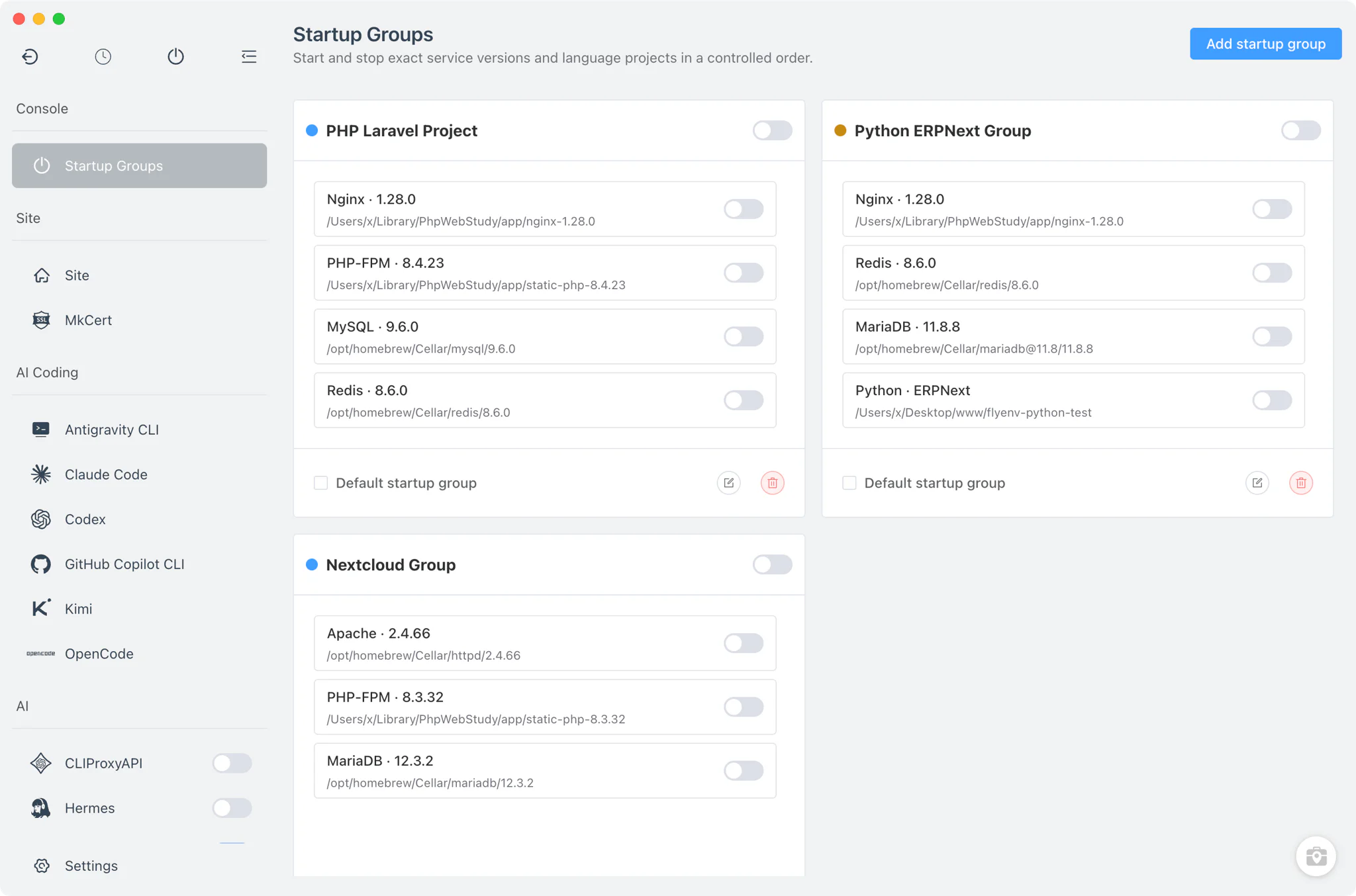
Keep each project’s web server, runtime and supporting services together.
A practical comparison of commonly used capabilities.
| Capability | Laragon | FlyEnv |
|---|---|---|
| Platforms | LimitedWindows only | AvailablemacOS, Windows, Linux |
| PHP versions | AvailableMultiple versions (environment-level switching) | AvailableMultiple managed versions (per project) |
| Web servers | AvailableApache, Nginx | AvailableNginx, Apache, Caddy |
| MySQL / MariaDB | AvailableBuilt-in | AvailableMultiple database modules |
| PostgreSQL / Redis | LimitedAddable / package-based | AvailableBuilt-in modules |
| Local custom domains | AvailableAutomatic Pretty URLs | AvailableBuilt-in and managed |
| Project configuration | LimitedEnvironment-oriented | AvailablePer-project runtimes, services and domains |
| Startup groups | LimitedNot available | AvailableBuilt-in project services |
| Database GUI tools | AvailableBundled or addable tools | AvailablephpMyAdmin, pgAdmin, DbGate and more |
| AI / MCP integration | Not included | AvailableFlyEnv MCP Server and AI CLI modules |
| Object storage | LimitedAdd separately | AvailableManaged MinIO / RustFS modules |
A side-by-side look at the same kind of work.
With Laragon
Add the required PHP versions
With FlyEnv
Install PHP 7.4 and PHP 8.3
With Laragon
Switch the active PHP version
With FlyEnv
Assign PHP 7.4 to Project A
With Laragon
Restart or reload the environment
With FlyEnv
Assign PHP 8.3 to Project B
With Laragon
Work on your project
With FlyEnv
Open either project without changing the other
With Laragon
Switch again for another project
With FlyEnv
Switch between projects without changing global PHP
Both tools can be useful; the right choice depends on your workflow.
If production parity depends on containers, Docker Desktop and the project's Compose files remain the more direct reference.
Not necessarily. If Laragon already fits your Windows-only workflow, there may be little reason to switch. FlyEnv becomes more useful when you need cross-platform consistency, project-specific runtime and service configuration, or more integrated modules.
Laragon is built for Windows. FlyEnv supports macOS, Windows, and Linux when your team or projects need the same local workflow across platforms.
Yes. FlyEnv can use existing project directories. You normally recreate the local site, runtime, services, and domain settings without rewriting application code.
Yes. Apache is available alongside Nginx and Caddy, so existing Apache-based projects can keep their familiar web-server setup.
Yes. FlyEnv can manage multiple PHP versions and assign the version each project or local site needs, without changing a global runtime for every project.
Yes. You can manage custom domains and local HTTPS per project or site, keeping host settings separate instead of switching one global environment.
Yes. FlyEnv brings databases, caches, mail testing, object storage, and other modules into one workspace so each project can start the services it needs.
FlyEnv helps teams align local runtimes, domains, and project services across macOS, Windows, and Linux. Production parity may still require containers or your team’s deployment standard.
Keep each project’s runtimes, domains and services configured independently.