Skip to content

Comparison

FlyEnv vs Laravel HerdLaravel-first workflow or general-purpose local development workspace?

Laravel Herd provides one of the most polished local development workflows for Laravel and PHP developers, with first-party ecosystem integrations such as Forge, herd.yml and Reverb. FlyEnv takes a broader approach: one local development workspace for PHP, Node.js, Python, Go, Java and infrastructure services across different kinds of projects.

macOSWindowsLinuxFree and open source
H

Laravel Herd

Optimized around Laravel development (macOS / Windows)

Laravel Site

my-app.test · PHP 8.4 pinned per site

PHP 8.4PHP 8.4NginxNginx

Herd Pro services

Managed services for the site

MySQLMySQLRedisRedisMinIOMinIOReverb

herd.yml shares the Laravel environment; Forge integration handles deployment.

F

FlyEnv

One workspace across different stacks (macOS, Windows, Linux)

Laravel · Project

NginxNginxPHP 8.4PHP 8.4MySQLMySQLRedisRedis

Node.js App · Project

CaddyCaddyNode.jsNode.jsPostgreSQLPostgreSQLMinIOMinIO

Java App · Project

TomcatTomcatOpenJDKOpenJDKMySQLMySQLRedisRedis

Laravel, Node.js, Java and more — each project keeps its own stack in one app.

Why developers compare FlyEnv and Laravel Herd

Both run fast, native PHP environments. The real difference is what each product is centered around.

01

Laravel-first vs framework-agnostic

Herd is built around Laravel, PHP, Composer, Forge, Reverb and herd.yml. FlyEnv covers Laravel too, but also WordPress, Node.js, Python, Go, Java / Tomcat and self-hosted apps like ERPNext, Gitea or Keycloak. The difference is not feature count — it is the center of the product.

02

Laravel ecosystem integration vs general infrastructure workspace

Herd offers first-party Laravel integration: Forge deployment, herd.yml, Reverb and Laravel-focused tooling. FlyEnv instead offers broader runtime families, more database and service modules, multiple web servers, bundled database GUI tools and Startup Groups.

03

Convention-driven setup vs modular environment composition

Laravel conventions reduce setup work for Laravel projects: parked directories, per-site PHP versions and herd.yml come out of the box. FlyEnv instead lets you choose and combine runtimes, web servers, databases and services according to each project’s stack — Laravel or not.

Different development models

Same purpose, different development scope.

H

Laravel Herd

Laravel-first, per-site PHP (macOS / Windows)

Laravel project

Laravel Herd

PHP 7.4–8.5, pinned per site

Nginx with automatic .test domains

herd.yml shared environment config

Laravel Reverb and Herd Pro services

Laravel Forge deployment integration

  • Deeply optimized for Laravel and PHP development
  • Per-site PHP version pinning
  • herd.yml shares Laravel environment configuration
  • Laravel Forge integration
  • Managed databases and services via Herd Pro
  • ×macOS and Windows only
F

FlyEnv

One workspace across different stacks

LaravelLaravel

NginxNginx

PHP 8.4PHP 8.4

MySQLMySQL

RedisRedis

Node.js AppNode.js App

CaddyCaddy

Node.jsNode.js

PostgreSQLPostgreSQL

MinIOMinIO

Java AppJava App

TomcatTomcat

OpenJDKOpenJDK

MySQLMySQL

RedisRedis

  • Cross-platform (macOS, Windows, Linux)
  • Multiple runtime families and service versions
  • Custom domains and HTTPS per project
  • Databases, cache, object storage and mail testing built in
  • Each project keeps its own runtime and service configuration

What this looks like in daily development

See the same setup in FlyEnv's runtime, Host, and service workflows.

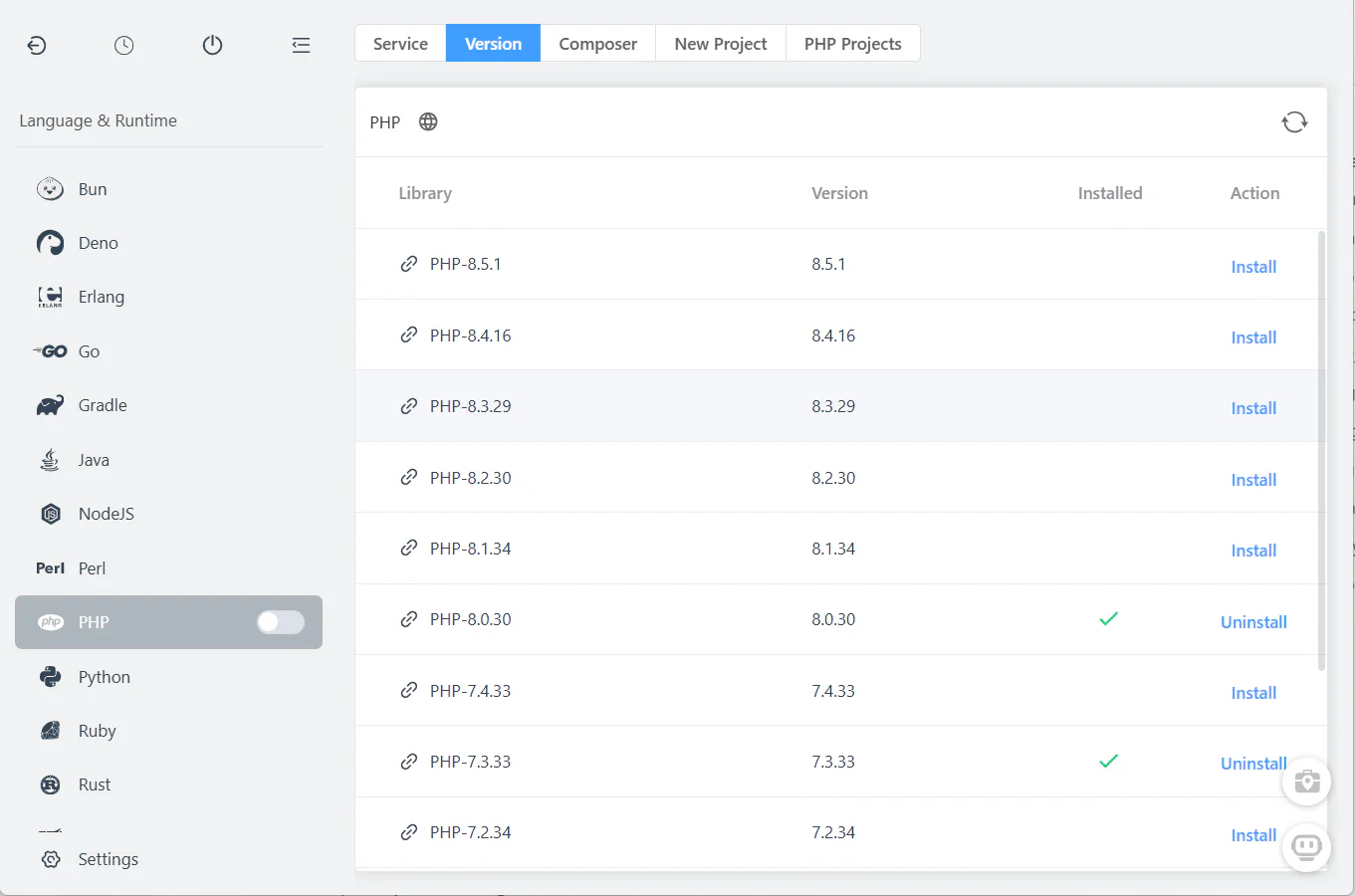
FlyEnv runtime version installation interface

Multiple runtime families

Install and manage PHP, Node.js, Python, Go and Java versions side by side, and use whichever runtime each project needs.

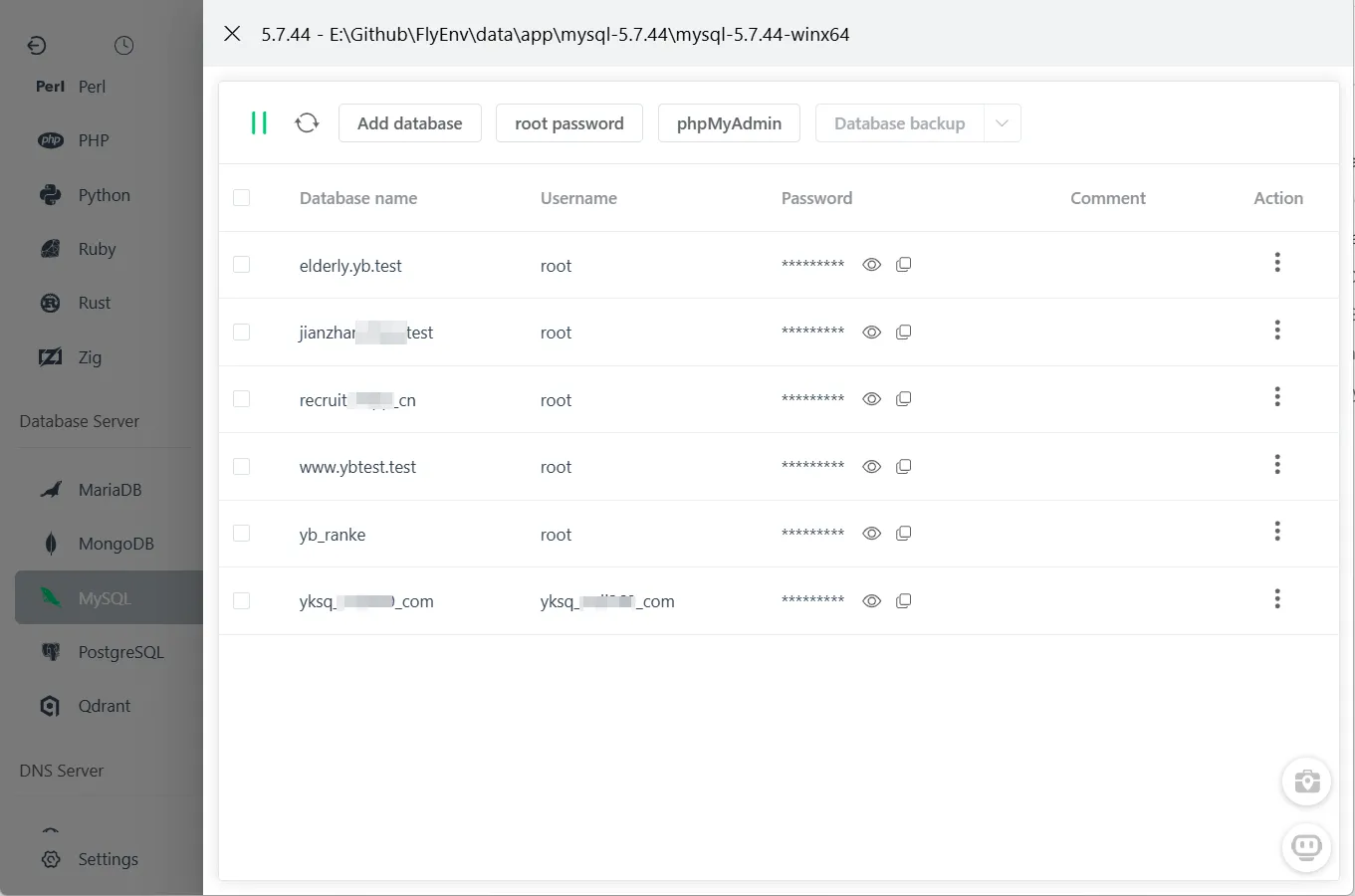
FlyEnv database management interface

Integrated infrastructure modules

Databases, Redis, object storage, mail testing and search engines run as managed modules next to your projects.

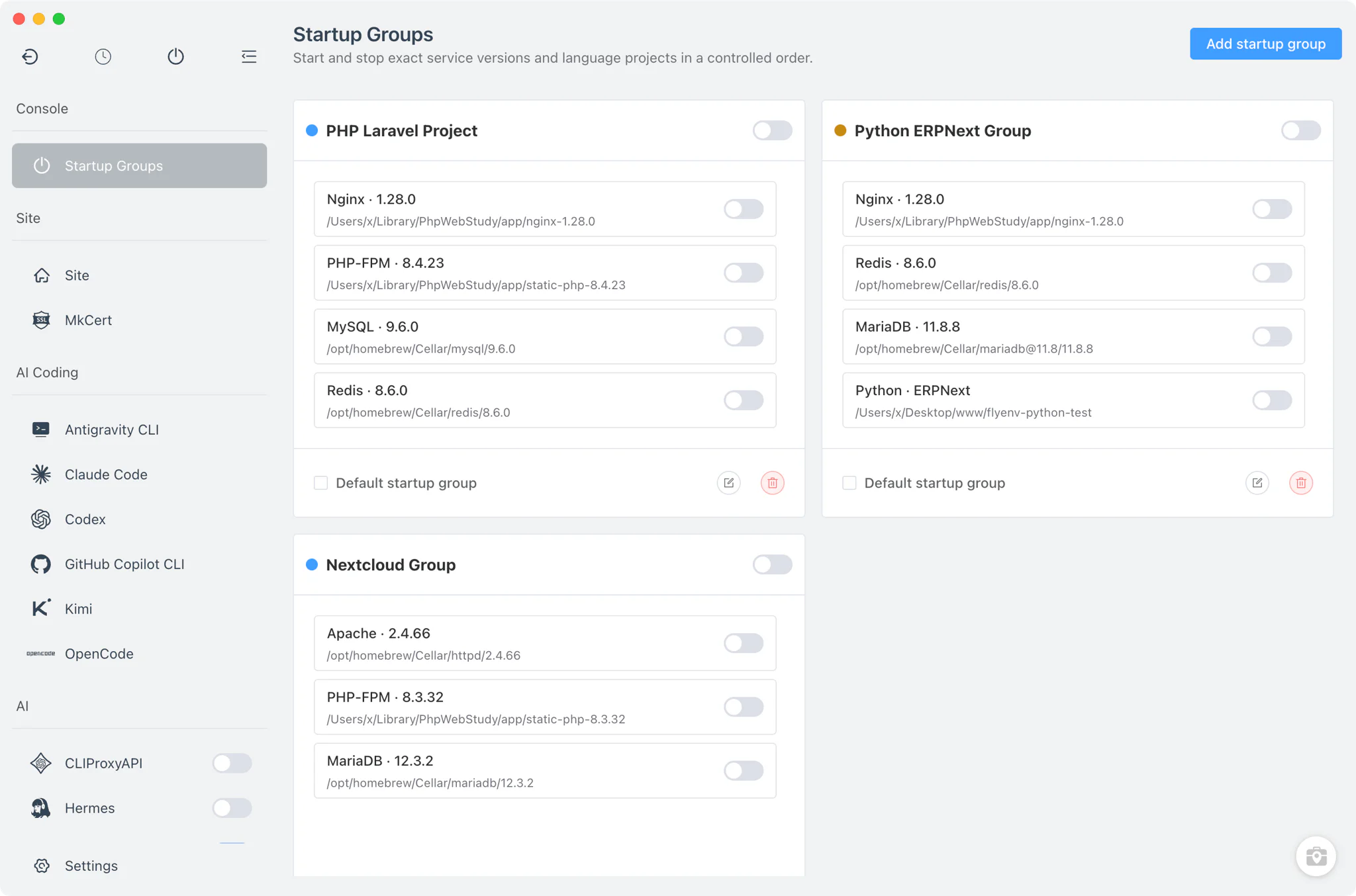
FlyEnv service management interface

Compose a complete project environment

Start PHP, MySQL, Redis, Mailpit and the other services a project depends on together with a Startup Group — one click starts the whole stack.

Feature comparison

A practical comparison of commonly used capabilities.

CapabilityLaravel HerdFlyEnv
PlatformsAvailablemacOS, WindowsAvailablemacOS, Windows, Linux
PHP versionsAvailablePHP 7.4–8.5 with per-site pinningAvailableMultiple managed versions, assigned per project
Node.js / other runtimesAvailableNode.js via nvm (Herd Pro); PHP-focused overallAvailableNode.js, Python, Go, Java, Ruby, Rust and more
Web serversAvailableNginxAvailableNginx, Apache, Caddy
DatabasesAvailableMySQL, MariaDB, PostgreSQL, MongoDB (Herd Pro)AvailableMultiple built-in database modules
Redis / cacheAvailableVia Herd Pro servicesAvailableBuilt-in Redis and Memcached modules
Search enginesAvailableTypesense, Meilisearch (Herd Pro)AvailableMeilisearch, Typesense and more
Object storageAvailableMinIO, RustFS (Herd Pro)AvailableManaged MinIO / RustFS modules
Local domains and HTTPSAvailableAutomatic .test domains and local HTTPSAvailableCustom domains and HTTPS per project
Laravel ecosystem integrationAvailableherd.yml, Laravel Forge, Laravel ReverbNot included
Mail testingAvailableBuilt-in SMTP mail catcher and email client (Herd Pro)AvailableBuilt-in Mailpit module
Startup groupsNot includedAvailableBuilt-in project services
Database GUI toolsLimitedNo bundled GUI; herd db opens site databases in clients like TablePlusAvailablephpMyAdmin, pgAdmin, DbGate and more
AI / MCP integrationAvailableBuilt-in MCP server (herd-mcp) for AI coding agentsAvailableFlyEnv MCP Server and AI CLI modules

Typical workflow: switching between Laravel and non-Laravel projects

A side-by-side look at the same kind of work.

With Laravel Herd

1

Create or open the Laravel project

With FlyEnv

1

Laravel project → PHP, Nginx, MySQL and Redis

With Laravel Herd

2

Herd serves the site with its pinned PHP version

With FlyEnv

2

Node.js app → Node.js and PostgreSQL

With Laravel Herd

3

Start the Herd Pro services the app needs

With FlyEnv

3

Python app → Python and Redis

With Laravel Herd

4

Share the environment via herd.yml and Laravel tooling

With FlyEnv

4

Java app → Tomcat and MySQL

With Laravel Herd

5

A Node.js or Java project is outside Herd’s primary workflow — another tool covers that stack

With FlyEnv

5

Manage all of them from the same workspace

Which one should you choose?

Both tools can be useful; the right choice depends on your workflow.

Choose Laravel Herd if

  • Laravel and PHP make up most of your development work.
  • You want a polished workflow designed around Laravel conventions.
  • You value deep Laravel ecosystem integrations such as Forge and herd.yml.
  • Herd Pro's managed services cover the infrastructure your applications usually need.
  • You prefer a tool that stays closely aligned with the Laravel ecosystem.

Choose FlyEnv if

  • You regularly work outside Laravel and PHP.
  • You use PHP, Node.js, Python, Go or Java across different projects.
  • Your projects require a wider mix of databases and infrastructure services.
  • You want different application stacks managed from one desktop workspace.
  • You value Startup Groups, integrated management tools and FlyEnv's MCP workflow.

If nearly all of your work is Laravel, Herd is the more specialized tool. If your week spans several stacks, one workspace matters more than Laravel-specific extras.

Frequently asked questions

Should I switch from Laravel Herd to FlyEnv?

Not necessarily. If you mostly build Laravel applications on macOS or Windows, Herd is an excellent, deeply integrated tool. FlyEnv becomes more useful when you work across several languages and frameworks, need Linux support, or want more infrastructure modules built in.

Does FlyEnv support Laravel development?

Yes. FlyEnv runs complete Laravel stacks: multiple PHP versions, Nginx, Apache or Caddy, MySQL, MariaDB, PostgreSQL, Redis, queues and local domains with HTTPS. What it does not include is Laravel-specific tooling such as herd.yml or Forge integration.

Can FlyEnv replace Herd Pro services?

For local development, largely yes. MySQL, MariaDB, PostgreSQL, MongoDB, Redis, MinIO, RustFS, Typesense and Meilisearch are available as built-in FlyEnv modules rather than a paid add-on tier, and FlyEnv’s Mailpit module covers the same local mail testing as Herd Pro’s mail server. Herd Pro also includes Laravel-specific extras like Reverb and the debug dump window, which FlyEnv does not replicate.

Does FlyEnv support herd.yml or Laravel Forge?

No. herd.yml and Forge integration are Laravel-ecosystem features of Herd. FlyEnv instead uses per-project site configuration and Startup Groups to keep each project’s services together.

Can I run Node.js, Python or Java projects with FlyEnv?

Yes. FlyEnv manages Node.js, Python, Go, Java and other runtimes next to PHP, so non-Laravel projects live in the same workspace as your Laravel apps.

Does FlyEnv work on Linux?

Yes. FlyEnv supports macOS, Windows and Linux. Laravel Herd currently supports macOS and Windows.

Can I keep my existing Laravel projects?

Yes. Point a FlyEnv local site at your existing project directory, pick the PHP version and services it needs, and keep working — no application rewrite is required in most cases.

Can I use Herd and FlyEnv together?

Yes. Some developers keep Herd for Laravel-focused work and use FlyEnv for Node.js, Java, Python or infrastructure-heavy projects. Just avoid running two web servers or databases on the same ports at the same time.

Manage more than Laravel projects in one local workspace

Keep Laravel, Node.js, Python, Go, Java and their local services in one development workspace.

Download FlyEnv