D
Docker
Containerized stack
Host OS
↓
Docker
 Nginx
Nginx PHP
PHP MySQL
MySQL Redis
RedisImages, containers, networks and volumes defined as code.
Comparison
FlyEnv runs development runtimes and services natively on your machine. Docker packages applications and dependencies into containers. Both can build complete local environments, but they optimize for different goals.
Containerized stack
Host OS
Docker
NginxPHPMySQLRedisImages, containers, networks and volumes defined as code.
Native services on the host OS
Host OS
NginxPHPMySQLRedisRuntimes and services run directly as native processes.
Same application, different execution model.
Containerized stack defined in compose.yaml
Host OS
Docker
Nginx containerPHP containerMySQL containerRedis containernetwork: app-net
volumes: db-data, redis-data
▤compose.yaml
Containerized stack defined in compose.yaml.
Native services on the host OS
Host OS
NginxnativePHPnativeMySQLnativeRedisnative Project filesnormal filesystem
Native services on the host OS.
The tools share a goal — a working environment — but take different paths to get there.
FlyEnv runs PHP, MySQL, Redis, and Nginx directly as native host services. Docker organizes the same pieces as images, containers, networks, and volumes — with strong isolation between them and the host.
FlyEnv offers a faster mental model for local development — no Dockerfile or Compose file is required for ordinary local services. Docker's environment definition travels with the project and can align development with CI, staging, and production.
FlyEnv — pick a version in the GUI, start the service, create a site. Docker — define services in compose.yaml and start the whole stack with one command.
The same stack, experienced through two different workflows.
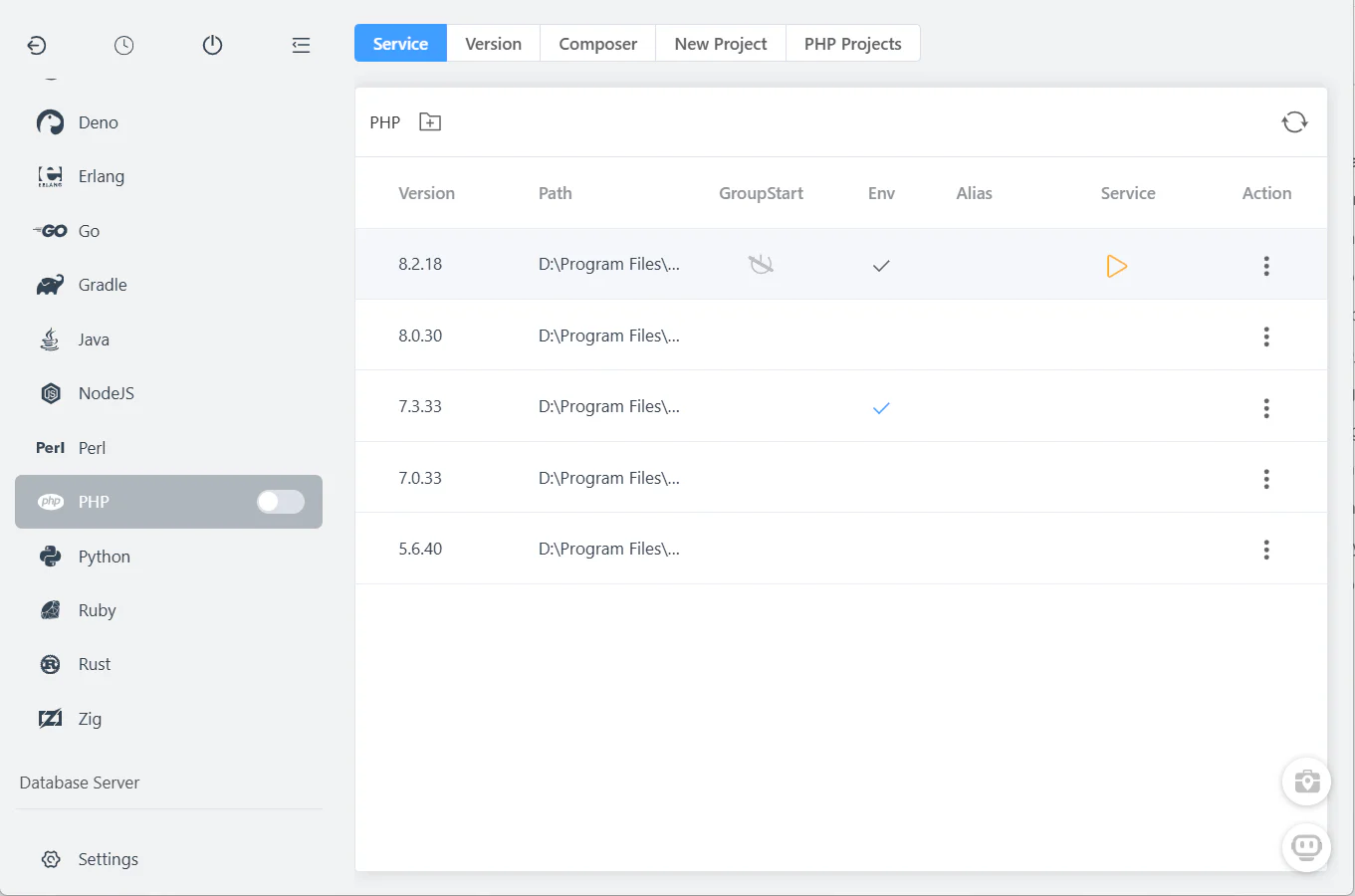
FlyEnv services are installed, started, and stopped from the desktop app — versions, ports, and configuration included.
services:
app: # image, ports, volumes
db: # image, environment
redis: # image, networks
Docker services are declared as images, ports, volumes, and networks in YAML — a precise, version-controlled definition of the environment.
Docker's strength: the same definitions can run in CI, staging, and production. FlyEnv optimizes for the local machine instead.
A comparison of models, not feature counts — both sides can build a complete local environment.
| Capability | Docker / Docker Compose | FlyEnv |
|---|---|---|
| Execution model | Containers | Native host processes |
| Environment definition | Dockerfile / Compose YAML | GUI and project configuration |
| Isolation | Strong container isolation | Host-level services |
| Production portability | Strong | Not the primary goal |
| CI/CD portability | Strong | Limited / not primary |
| Local domains / HTTPS | Configure via stack or proxy | Built-in local site workflow |
| Runtime versions | Container image tags | Managed local versions |
| Database services | Container images | Managed native modules |
| Networking | Docker networks | Host networking |
| Volumes | Docker volumes / bind mounts | Native filesystem |
| Project startup | docker compose up | UI and Startup Groups |
| Resource overhead | Docker runtime or VM depending on OS | Native processes |
| GUI management | Docker Desktop and tools | FlyEnv |
| Best suited for | Portable, reproducible container environments | Native local development |
A side-by-side look at the same kind of work.
With Docker
Write or select Dockerfiles and images
With FlyEnv
Select the PHP version
With Docker
Create compose.yaml
With FlyEnv
Create a local site
With Docker
Configure ports
With FlyEnv
Start the database and cache
With Docker
Configure volumes
With FlyEnv
Enable HTTPS
With Docker
Configure networks
With FlyEnv
Start the project services
With Docker
Start with docker compose up
With FlyEnv
Open the site and start developing
Docker's additional configuration is also what makes the environment portable and reproducible across machines and deployment stages.
Both tools can be useful; the right choice depends on your workflow.
FlyEnv and Docker are not mutually exclusive — many teams use native services locally and containers everywhere else.
No. FlyEnv manages native local services; Docker packages apps into containers. They solve different problems and can be used together.
When production parity, isolation, or reproducible CI/staging environments matter, or when the project already ships a compose.yaml.
When you want a fast native local environment with managed runtimes, local domains and HTTPS, without writing Dockerfiles or Compose files.
Yes — a common setup is FlyEnv for day-to-day native development and Docker for CI, integration tests, or projects that require container parity. Avoid port conflicts between the two.
No. FlyEnv runs runtimes and services as native host processes on macOS, Windows and Linux.
Not out of the box. You typically add a reverse proxy (Traefik, nginx-proxy) and certificates (mkcert or a CA) yourself; FlyEnv includes a built-in local site workflow for domains and HTTPS.
If the team deploys containers, Docker's compose.yaml is the strongest shared contract. For teams that develop natively on macOS, Windows and Linux, FlyEnv gives everyone the same desktop workflow.
Yes — the compose file stays untouched; you can still run the app's runtime and services natively in FlyEnv, or just keep using Docker for that project.
Create a local site, select the runtimes and services it needs, and start working — no containers required.